Comparison
LingoManga vs Desktop Manga Translators
The main choice is not which model is best — it is where the work happens. Open-source desktop tools such as Comic Translate and BallonsTranslator run on your own computer and you configure them. LingoManga is a web service: upload one chapter, preview every page free, and download a translated ZIP for $4.90.
At a glance
| What matters | LingoManga (web) | Open-source desktop tools |
|---|---|---|
| Setup | Open a page and upload | Install software, configure models or API keys |
| Where pages are processed | On the server | On your computer |
| Cost | $4.90 per chapter, no subscription | Free software; possible model or API costs |
| Input | One .zip or .cbz, 3–60 pages, up to 25 MB | Varies by tool; often images, folders or archives |
| Output | One ZIP of translated pages in the original order | Varies by tool; usually images or a project file |
| Before paying | Whole chapter preview free | No payment to preview; you run it yourself |
| Manual fixes | Not editable; check the preview and request a refund if broken | Can edit bubbles by hand |
| Phone or tablet | Works in the browser | Usually desktop only |
| Offline | No | Can work offline once models are local |
Desktop tool features change often. This table describes the general category; check each project’s own documentation for its current requirements.
How to judge this comparison
This page is written by LingoManga, so treat it as our account of the trade-off, not an independent benchmark. The part you can check yourself is the output: the sample below is a real page from the pipeline, original next to output, and the free preview lets you test your own chapter before paying.
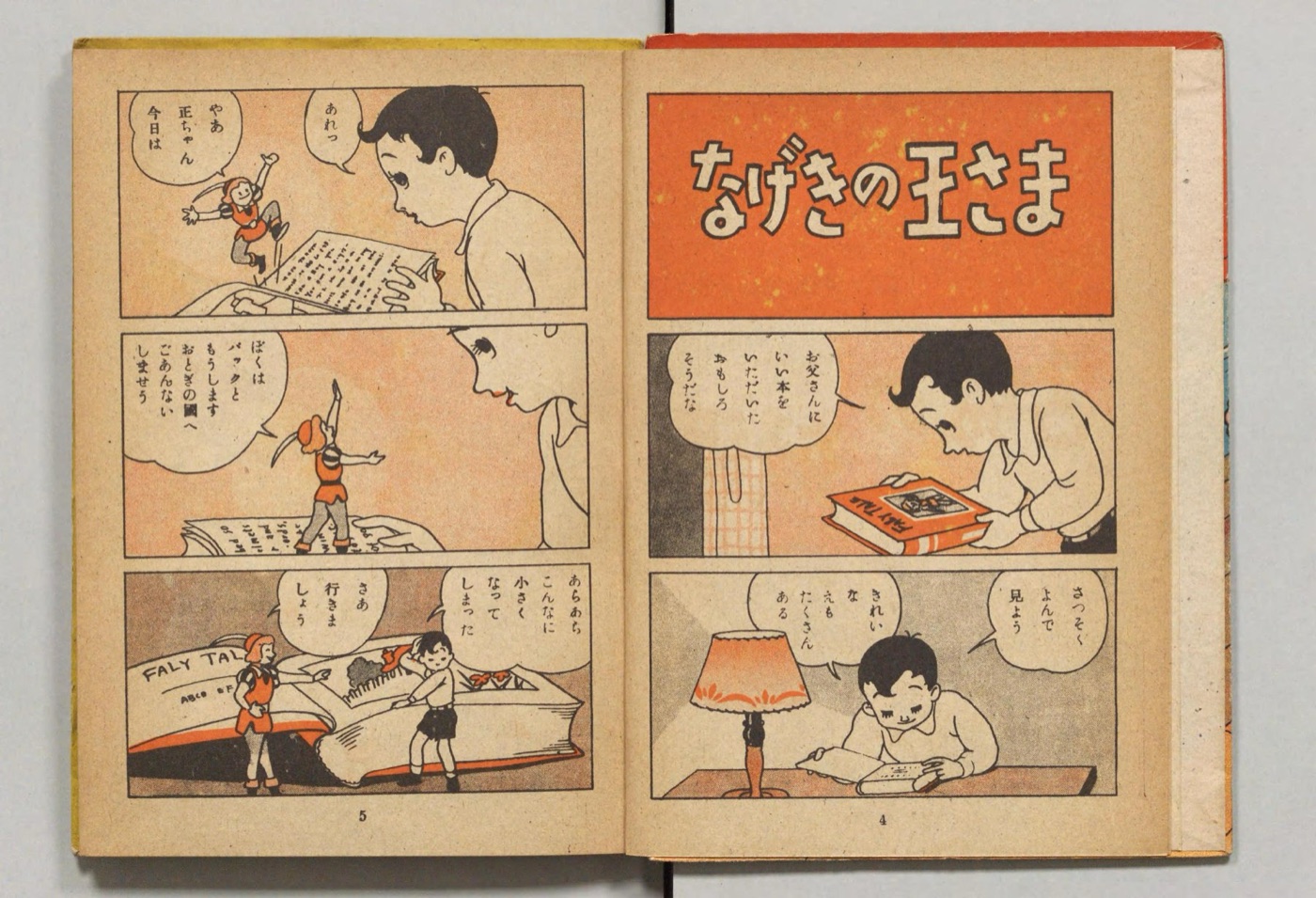
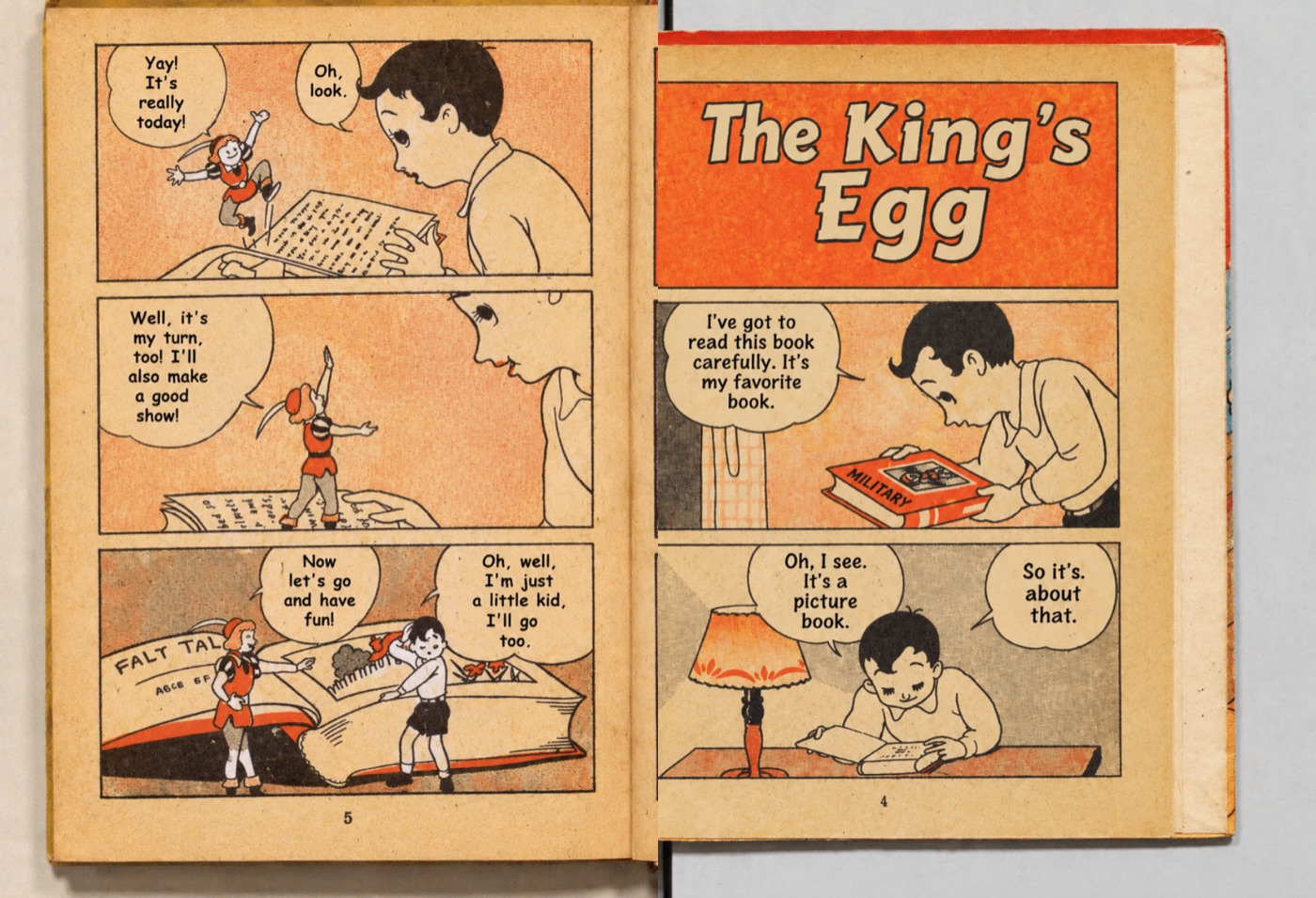
Public-domain scan from パックの冒険 (1930s, Wikimedia Commons). The English page is the pipeline output; nothing was re-lettered by hand.
What we do not claim: there is no independent, side-by-side quality study behind this page. Open-source tools can do things this service cannot, such as hand-editing individual bubbles.
Processing, privacy and refunds
| Processing | Usually 1–3 minutes per chapter. Pages are processed one at a time, and the page count is shown before the job starts. |
|---|---|
| Privacy | Uploaded pages are used only to produce your chapter, and files are deleted after 7 days. Previews and downloads are private links; there is no public gallery. |
| Refunds | A chapter that cannot be delivered can be refunded on request. Refunds are not automatic for a translation you simply dislike — the free preview exists so you can judge before paying. |
| Policies | Privacy policy · Terms · Refund policy |
When a desktop tool is the better choice
- You want to edit individual bubbles by hand after the automatic pass.
- You are comfortable installing software and managing models or API keys.
- You need to work offline or keep pages entirely on your own machine.
- You are translating many chapters and prefer a fixed local setup.
When LingoManga is the better choice
- You want a chapter readable now, without installing anything.
- You are on a phone, tablet or a computer you do not want to set up.
- You want to see the whole translated chapter before spending money.
- You want one ZIP back in page order, with support and refunds when something fails.
What both approaches share
Both translate the text on the page and place new lettering into the original bubbles. Both can struggle with stylized sound effects, unusual fonts and puns. Whichever you choose, check the result before you rely on it — LingoManga makes that check free with a whole-chapter preview. See a real before-and-after sample.
Questions
Are open-source desktop manga translators free?
The software itself is free and open source, and it runs on your own computer. Some setups need you to supply your own model or API key, which can cost money, and features and requirements change over time — check each project’s own site before relying on it.
Why pay $4.90 when a desktop tool is free?
You pay for not installing anything, not managing models or API keys, and not tuning settings. LingoManga also shows the whole chapter as a free preview before payment, returns one ZIP in page order, and can refund a chapter that cannot be delivered.
Can I use LingoManga on a phone or tablet?
Yes. It runs in the browser, so you can upload a chapter and read the free preview on a phone, tablet or laptop without installing software.
Does LingoManga work offline?
No. Pages are processed on the server, so an internet connection is required. Desktop tools run locally and can work offline once models are downloaded.
Which is more accurate?
It depends on the page and the setup. Desktop tools give you manual control to fix a bubble by hand; LingoManga is automatic and shows the whole chapter as a preview so you can judge the result before paying.